Spring Romantic Mockup Notebook: A Practical Tool for Visualizing Brand Concepts
For professionals and creatives who work with branding, marketing, or product design, visual representation is key. The Spring Romantic Mockup Notebook offers a realistic, high-quality way to showcase your designs in an engaging format. This digital mockup allows you to place your artwork, typography, or logos onto a beautifully rendered notebook, making it ideal for social media posts, promotional materials, or portfolio presentations.
What Is the Spring Romantic Mockup Notebook?
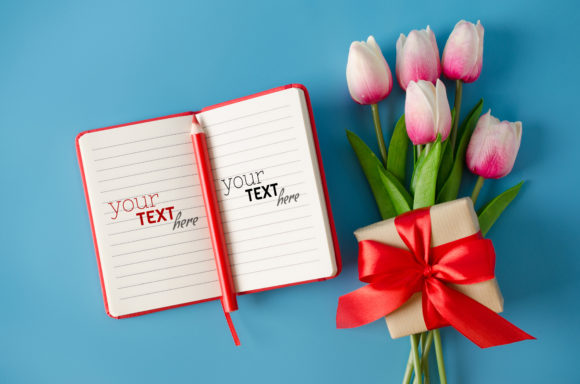
The Spring Romantic Mockup Notebook is a digital photo-based mockup delivered as a high-resolution PSD file. It features a notebook design that exudes springtime charm and romantic aesthetics, perfect for lifestyle, fashion, beauty, or creative brand content. Unlike 3D or vector-based mockups, this one uses real-life photography enhanced with smart object layers, enabling seamless integration of your own designs without requiring advanced graphic skills.
This mockup is especially useful when you need to visualize how your brand assets will appear on physical products before final production. It’s commonly used by designers, marketers, bloggers, and small business owners looking to create authentic-looking images quickly and efficiently.
Where Does It Fit Into Your Workflow?
Incorporating the Spring Romantic Mockup Notebook into your workflow can happen at various stages:
- Before a project launch: Use it to test different color schemes, fonts, or branding elements on a tangible surface like a notebook. This helps refine your concept before investing time or money into full-scale development.
- During the design process: As you iterate through your concepts, the mockup provides a consistent base to evaluate each version. You can easily swap out designs using the smart layer to see what works best visually.
- After completion: Once finalized, apply your design to the mockup for presentation purposes. Whether you're pitching to clients or sharing on social media, having a polished image adds professionalism and clarity.
Preparation Tips for Using the Mockup
Before applying your design to the Spring Romantic Mockup Notebook, consider the following steps to ensure compatibility and quality:
- Understand the file structure: Open the PSD file and locate the smart object layer. This is where your design should be placed. If you’re new to smart objects, take a moment to familiarize yourself with how they work in Adobe Photoshop.
- Check dimensions and resolution: Ensure your design matches the size and orientation of the smart object area. The mockup is provided in high-resolution JPEG format (300 dpi), so your artwork should also be high-res to maintain quality.
- Use compatible file formats: While the mockup supports PSD files, if you're working in another program, export your design as a PNG or JPEG before pasting it into the smart object. Avoid using transparent backgrounds unless the smart object specifically allows them.
Integration With Other Tools and Resources
The Spring Romantic Mockup Notebook works well alongside other design tools and platforms. Here’s how it fits into a broader ecosystem:
- Adobe Creative Suite: Ideal for use with Photoshop, Illustrator, or InDesign. You can easily export your designs from these programs and import them into the mockup for a cohesive look.
- Canva or Figma: If you're using more accessible tools like Canva or Figma, you can download your design as a high-resolution image and then paste it into the smart object within the PSD file.
- Project management systems: Add the completed mockup to your Trello board, Notion page, or Asana task to keep your branding visuals organized and ready for review or client feedback.
Workflow Example for Small Business Owners
Imagine you’re launching a new line of greeting cards with a spring and romance theme. You’ve created several card designs in Adobe Illustrator but want to show how they’ll look when printed and displayed in-store. Here’s a practical approach:
- Create your greeting card design in Illustrator.
- Export the design as a high-resolution JPEG or PNG.
- Open the Spring Romantic Mockup Notebook in Photoshop.
- Double-click the smart object layer to replace the placeholder image with your design.
- Save the updated file and generate a preview image for your website or social media.
This method allows you to quickly visualize multiple options and choose the most appealing one for your audience.
Practical Implementation and Usability
One of the main advantages of the Spring Romantic Mockup Notebook is its usability. Since it's a photo-based mockup, the lighting, shadows, and textures are already baked in, giving your design a natural, realistic appearance. To make the most of it, follow these tips:
- Align your design with the notebook’s perspective. Misalignment can break the illusion and reduce the mockup’s effectiveness.
- Test different compositions. Try placing your logo in the corner, centering text on the cover, or using both sides of the notebook to highlight dual designs.
- Adjust colors if needed. Sometimes, the lighting in the mockup may alter the perceived color of your design. Use Photoshop’s adjustment layers to fine-tune hues and brightness.
Efficiency in Design Presentation
When preparing for a client meeting or a marketing campaign rollout, time is of the essence. The Spring Romantic Mockup Notebook streamlines the presentation phase by allowing you to focus on your design rather than the setup of the mockup itself. Because it includes a smart object layer, even beginners can use it effectively after a quick tutorial.
Consider pairing it with other mockups such as coffee mugs, tote bags, or calendars to create a complete look-and-feel package for your brand. These combined visuals give stakeholders a clearer idea of your brand identity across multiple touchpoints.
Long-Term Use and Consistency
Consistency is crucial in branding. The Spring Romantic Mockup Notebook can help you maintain a uniform style across all your promotional efforts. For instance, if you're running a seasonal campaign in March or April, using the same mockup format for all related content ensures your audience recognizes the theme instantly.
To maximize long-term use, store the mockup in your design library along with other templates and assets. Label it clearly so others on your team can access it easily. Also, document any adjustments you made during previous projects—like font sizes, alignment settings, or color corrections—to save time in the future.
Quality Control and File Management
Since this is a digital download, it's important to handle the file properly to avoid issues down the line:
- Extract the .zip file immediately upon download and organize the contents in a dedicated folder.
- Keep a backup of the original PSD file before making any edits. This allows you to reset or reuse the template later.
- If you're part of a team, share the mockup via cloud storage or collaboration tools with clear instructions on how to edit the smart object.
Remember, the typography applied in the mockup is not included. If your design relies heavily on specific fonts, make sure those are embedded or available in your editing software to avoid rendering problems.
Real-World Applications and Outcomes
Creative entrepreneurs often use the Spring Romantic Mockup Notebook to present their work in a lifestyle context. For example, a stationery designer might use it to show how their journal covers would look in a retail setting. Similarly, educators and bloggers might use it to illustrate a learning activity or promote a downloadable resource with a romantic twist.
Here are a few common use cases:
- Social Media Content: Create eye-catching Instagram or Pinterest posts by showing your design on a notebook. Pair it with relevant hashtags like #springdesigns or #romanticbranding to reach your target audience.
- Client Proposals: Include the mockup in your pitch deck or proposal to demonstrate how your design will translate into real-world applications.
- E-commerce Product Images: Use it to showcase your merchandise before printing, helping customers get a feel for the product without needing a physical sample.
Observations From Real Users
Many users have found that the Spring Romantic Mockup Notebook enhances the perceived value of their products. The soft pastel tones and floral accents resonate well with audiences interested in lifestyle and personal care brands. However, it’s important to match the mockup to your brand’s tone—if your brand is minimalist, the romantic aesthetic might not be the best fit.
Others appreciate how easy it is to customize. The smart object feature eliminates the need for complex layering or masking techniques. Just paste your design, adjust if necessary, and you're done. This efficiency makes it a favorite among freelancers and small teams with limited design resources.
Organizing Your Mockup Usage
To integrate the Spring Romantic Mockup Notebook smoothly into your routine, consider the following organizational strategies:
- Set up a naming convention for your saved mockups. For example, "Spring_Notebook_V1.psd" or "RomanticMockup_ClientA.jpg".
- Group mockups by season, theme, or project type. This makes it easier to retrieve them later when planning similar campaigns.
- Include a notes section in your project documentation explaining which mockups were used and why. This aids in maintaining consistency and understanding over time.
By organizing your mockups thoughtfully, you can streamline your design process and ensure that you always have the right visuals ready when inspiration strikes.
Conclusion
The Spring Romantic Mockup Notebook is a valuable addition to any designer's toolkit. Its combination of realism, ease of use, and flexibility makes it suitable for a wide range of applications—from branding to marketing to educational content. By understanding how it fits into your workflow and integrating it effectively with other tools, you can enhance your design output while saving time and effort.
Whether you're an entrepreneur showcasing your latest product or a marketer crafting a seasonal campaign, this mockup helps you communicate your ideas with clarity and style. Keep it in your digital arsenal and explore how it can bring your creative visions to life in a professional, attractive format.
Thanks for shopping. Best regards.