How to Use a Christmas Mockup Postcard in Your Branding and Social Media Strategy
In the world of digital marketing, visual content is king. Whether you're promoting holiday sales, sharing festive greetings, or building brand awareness during the Christmas season, having the right visuals can make all the difference. One powerful tool that designers and marketers use is the Christmas Mockup Postcard. This high-resolution image, designed as a PSD file with smart layers, allows for seamless customization and integration into various branding and social media efforts. Let’s dive into how this mockup can elevate your designs and why it's a must-have in your creative toolkit.
What Is a Christmas Mockup Postcard?
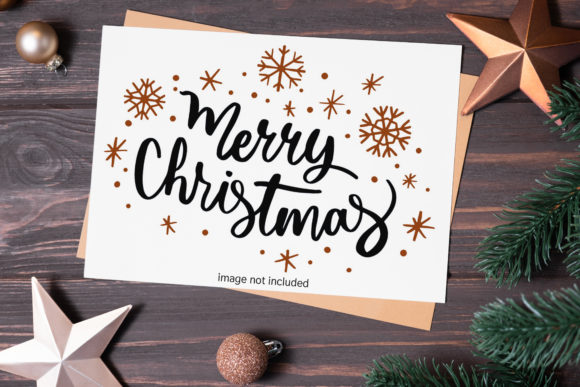
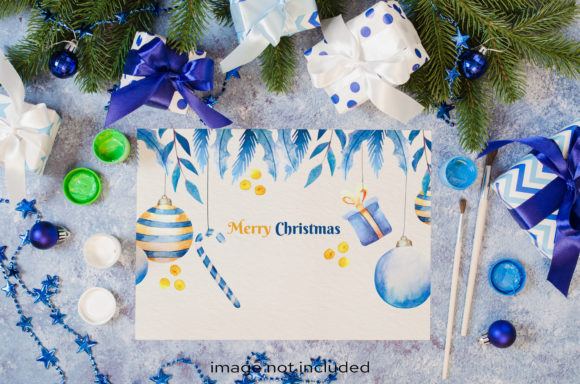
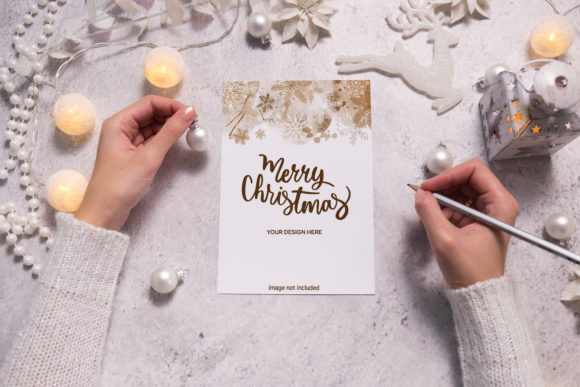
A Christmas Mockup Postcard is a digital template that simulates the look of a real postcard. It's typically used to showcase product designs, holiday messages, or promotional content in an aesthetically pleasing format. Unlike 3D or vector mockups, this type uses a photo-based design, which means it looks more natural and realistic when printed or shared online.
These mockups are often delivered as PSD files, making them compatible with Adobe Photoshop. The key feature is the smart layer object, which allows users to easily insert their own designs without worrying about resizing or distorting the overall layout. Once you've placed your artwork inside the smart object, you can save the file and generate a high-quality output ready for use.
Why High Resolution Matters for Your Designs
When it comes to print or digital media, resolution plays a crucial role in the final quality of your work. A Christmas Mockup Postcard is usually provided at 300 dpi, which is considered the standard for professional printing. This ensures that any text, images, or logos you add will appear sharp and clear — whether viewed on a phone screen or printed out for distribution.
High-resolution mockups also allow for greater flexibility. If you plan to zoom in on your postcard design in a presentation or social media post, the details won’t get lost. This makes them ideal for showcasing intricate designs, such as holiday illustrations, gift tags, or custom typography.
Smart Object Layers: The Designer’s Secret Weapon
One of the most significant advantages of using a Christmas Mockup Postcard is the inclusion of smart object layers. These layers let you place your own design elements into the mockup without altering the original structure. This means you can:
- Edit your design independently from the background
- Resize, rotate, or adjust your artwork without losing quality
- Ensure alignment and proportion remain consistent
For example, if you’re designing a festive logo to go on a postcard, you can simply paste it into the smart object. Then, once you save the file, your logo will be perfectly embedded into the mockup. This saves time and eliminates the need for complex layer adjustments or manual resizing.
Perfect for Branding and Social Media Campaigns
The Christmas season is one of the busiest times for businesses, especially those in retail, hospitality, and e-commerce. A well-designed Christmas Mockup Postcard can help you stand out by giving your promotions a polished, professional look. Here’s how they fit into modern branding and social media strategies:
- Festive Promotions: Use the mockup to display holiday offers, discounts, or special events in a visually appealing way. This helps grab attention and encourages customer engagement.
- Social Proof: Showcasing your product or service on a realistic postcard mockup gives followers a sense of what they can expect, increasing trust and conversion rates.
- Brand Consistency: With smart objects, you can maintain brand colors, fonts, and imagery across all your holiday campaigns, ensuring a cohesive visual identity.
Whether you're creating content for Instagram, Facebook, or even email newsletters, a Christmas Mockup Postcard provides a clean and elegant backdrop that complements your message.
Getting Started with the Mockup File
Once you’ve downloaded the Christmas Mockup Postcard (remember, it's a DIGITAL DOWNLOAD), you'll receive a .zip file containing the PSD mockup and a JPEG preview. Here’s a quick guide to using it effectively:
- Unzip the file: Make sure you extract the contents before opening the PSD in Photoshop.
- Open the PSD: Launch Adobe Photoshop and open the mockup file. You should see multiple layers, including the smart object where your design will go.
- Edit the Smart Object: Double-click the smart object layer to edit its contents. Paste your design here and make any necessary adjustments.
- Save and Export: After editing, save the file and export it as a JPEG or PNG for web use, or keep it as a PSD for further edits.
This straightforward workflow makes the mockup easy to integrate into your existing design process, even if you're not a seasoned graphic designer.
Common Considerations Before Using the Mockup
Before you start working with a Christmas Mockup Postcard, there are a few things to keep in mind:
Typography Isn't Included
While the mockup itself is high resolution and customizable, the typography applied in the design is NOT INCLUDED. This means you’ll need to provide your own text or font styles if you want to replicate the exact look. However, this also gives you the freedom to personalize the design with your brand’s specific messaging and style guidelines.
File Format Compatibility
Since the mockup is a PSD file, you’ll need Adobe Photoshop to fully utilize the smart object features. If you don’t have access to Photoshop, consider using alternative tools like GIMP or Canva that support similar workflows. Just be aware that some advanced features may be limited outside of Photoshop.
Use the Preview Wisely
The included JPEG preview file is useful for quickly seeing how your design looks within the context of the postcard. While it's great for sharing or showing clients, always rely on the full-size, high-resolution PSD for final edits and outputs. This ensures the best possible quality for both print and digital applications.
Real-World Applications of a Christmas Mockup Postcard
Here are some practical examples of how you can use a Christmas Mockup Postcard in your projects:
1. Holiday Product Launches
If you're launching a new product around the holidays, placing it on a Christmas Mockup Postcard can give it a seasonal feel. For instance, a coffee shop might create a postcard featuring their new winter blend, complete with snowflakes and warm colors, then share it on social media to build anticipation.
2. E-Commerce Seasonal Ads
E-commerce brands often use postcards to highlight limited-time offers. By using a mockup, they can show customers exactly how the offer would look in a tangible form, helping to boost click-through rates and sales.
3. Personalized Greetings
Small businesses and local shops can create personalized holiday greetings using these mockups. A boutique might design a postcard with their logo and a hand-written thank-you note, then send it out digitally via email or social media.
4. Influencer Collaborations
Influencers frequently partner with brands for holiday-themed content. A Christmas Mockup Postcard can serve as the perfect canvas for collaborative posts, allowing them to showcase products in a festive and authentic setting.
Best Practices for Maximizing Impact
To get the most out of your Christmas Mockup Postcard, follow these tips:
- Keep the Design Simple: Don’t overload the postcard with too much information. Focus on one main message or visual element to ensure clarity and impact.
- Match the Color Scheme: Align the colors in your design with the mockup’s aesthetic. This creates a harmonious look and enhances brand recognition.
- Add Realistic Textures: To make your design pop, consider adding subtle textures or effects that mimic paper, ink, or weathered edges. This adds depth and realism.
- Optimize for Different Platforms: When exporting the final image, create versions optimized for each platform. For example, square formats for Instagram and rectangular ones for Facebook or LinkedIn.
By following these best practices, you can ensure that your Christmas Mockup Postcard looks professional and engaging wherever it appears.
Where to Find and How to Choose the Right Mockup
There are many places online where you can find high-quality Christmas Mockup Postcards. When selecting one, consider the following factors:
- Style and Theme: Does the mockup match your brand's personality? Look for options that reflect your target audience’s preferences, whether it's traditional, modern, or whimsical.
- Resolution and Quality: Always confirm the mockup is 300 dpi and photo-based to avoid pixelation or unnatural looks.
- Layer Organization: A well-structured PSD file with clearly labeled smart objects and layers can significantly speed up your workflow.
- Licensing Terms: Since the mockup is a digital download, check the licensing agreement to understand how many times you can use it and whether commercial use is permitted.
Choosing the right mockup ensures that your final product aligns with your goals and maintains a professional appearance.
Final Thoughts on Workflow Integration
Integrating a Christmas Mockup Postcard into your workflow is simple and effective. From initial concept to final output, the smart layer system streamlines the process, allowing you to focus on creativity rather than technical hurdles. Whether you're updating your brand’s holiday materials or crafting eye-catching social media posts, this resource is invaluable.
Remember, the goal is to create content that resonates with your audience while maintaining brand integrity. A well-executed Christmas Mockup Postcard does just that — combining festive charm with professional polish. So take advantage of this digital tool and bring your holiday vision to life with ease and precision.