Earring Backings for Creative Crafting
Whether you're a seasoned crafter or just beginning to explore the world of DIY accessories, Earring Backing SVGs offer an exciting and versatile way to elevate your designs. These digital files are perfect for anyone looking to add a personal touch to their jewelry creations while leveraging the precision of electronic cutting machines. From simple outline shapes to bold solid designs, earring backings open up endless possibilities for customization and artistic expression.
What Are Earring Backings?
Earring backings are the small but essential components that hold earring fronts in place. Traditionally made from plastic, metal, or silicone, they ensure your earrings stay secure and comfortable. With custom earring backing SVGs, however, you can create unique backings that match the aesthetic of your front designs. These vector-based files allow for intricate detailing and seamless integration with various crafting tools.
Why Use Electronic Cutting Machines?
Electronic cutting machines like Cricut and Silhouette provide unmatched accuracy and repeatability when working with materials such as leather, felt, vinyl, and even 3D printing filaments. By using SVG files for earring backings, you can produce consistent, high-quality pieces without the guesswork involved in hand-cutting. This not only saves time but also allows for more experimentation with shapes, textures, and patterns.
File Formats Included in the Digital Download
The digital download comes with multiple file formats to suit different needs and software preferences. Here’s what you get:
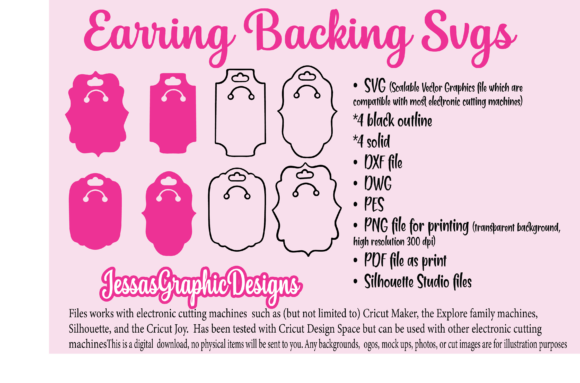
- SVG: Scalable Vector Graphics compatible with most electronic cutting machines (4 black outlines + 4 solid styles)
- DXF: Ideal for use with laser engravers and other industrial design software
- DWG: Suitable for CAD programs
- PES: Designed for Brother Scan N Cut machines
- PNG: High-resolution transparent background images for print then cut applications
- PDF: Perfect for direct printing or tracing on surfaces like wood or metal
- Silhouette Studio Files: No need to upgrade to premium versions — these are included for ease of use
This variety ensures that whether you're using Cricut Maker, Explore, Joy, or any Silhouette model, you’ll find the right format for your machine. The files have been tested with Cricut Design Space and Silhouette Studio Business Edition, making them reliable and ready to go straight out of the box.
Unlocking Creative Possibilities
The beauty of using earring backing SVGs lies in their adaptability. You’re no longer limited to generic, store-bought backings. Instead, you can craft backings that perfectly complement your earrings — matching colors, themes, or even adding subtle textural elements.
Ideas for Customization
Here are some practical ideas to spark your creativity:
- Vintage Style: Use ornate SVG designs to create antique-inspired earring backings for handmade costume jewelry.
- Modern Minimalism: Opt for sleek geometric shapes in solid fill to reflect contemporary fashion trends.
- Themed Designs: Create holiday-themed or seasonal earring backings to pair with matching jewelry sets.
- Branded Merchandise: Incorporate your logo or brand name into the backings for custom gifts or promotional items.
- Personalized Creations: Add initials, symbols, or meaningful motifs to make each piece feel one-of-a-kind.
Applications Across Industries and Hobbies
These SVG files aren’t just for hobbyists. They cater to a wide range of professionals and creators who want to streamline their production process while maintaining creative control:
For Small Business Owners
If you run a boutique or online shop specializing in handmade jewelry, custom earring backings can set your products apart. Imagine offering customers a choice between matte and glossy finishes, or metallic and wooden options — all backed by professionally designed templates that simplify manufacturing.
For Educators and Craft Instructors
In classrooms or workshops, these files can be used to teach students about design principles, material properties, and how to operate electronic cutting machines. Providing pre-made SVGs allows learners to focus on the creative process rather than struggling with file formatting.
For Home Decor Enthusiasts
Think beyond jewelry! Use the same SVG files to create decorative elements for home goods — maybe a matching set of earrings and keychains, or embroidered pillow accents. The consistency in design across projects gives your collection a cohesive look.
For Event Planners and Marketers
At weddings, birthdays, or product launches, customized earring backings can serve as memorable favors or branding tools. Pair them with printed tags or packaging for a polished finish that reflects professionalism and attention to detail.
Practical Tips for Using Earring Backing SVGs
To help you make the most of these files, here are a few tips based on real-world usage:
- Choose the Right Material: Consider durability and comfort when selecting materials like neoprene, hypoallergenic silicone, or soft leather.
- Test Before Mass Production: Always do a trial run to ensure the size, shape, and fit are correct before creating large batches.
- Optimize File Settings: Adjust stroke width and layer settings in your cutting software to avoid issues during the cutting process.
- Use Print Then Cut for Precision: If you’re working with PNG files, enable the “print then cut” feature for exact alignment every time.
- Keep It Organized: Label your layers and save variations separately to maintain clarity in your project folders.
Software Compatibility and Workflow
Thanks to the inclusion of multiple file types, you can easily integrate these SVGs into your workflow. For example, if you prefer working in Adobe Illustrator or AutoCAD, the DXF and DWG files will import smoothly. The Silhouette Studio files are especially helpful because they allow you to work efficiently without needing advanced features. Just drag and drop the design onto your canvas and adjust as needed!
Real-World Project Ideas
Let’s look at a few tangible ways you can use earring backing SVGs in your next project:
Custom Jewelry Kits
Create DIY kits where customers can choose their favorite earring front and backing. Offer a selection of materials and let them personalize their own pieces. This approach is popular among gift shops and Etsy sellers looking to engage buyers in a hands-on experience.
Gift Packaging Accents
Print earring backings onto kraft paper or cardstock and attach them to gift boxes as decorative labels. It’s a subtle yet effective way to reinforce your brand identity or theme the package around a specific event.
Event Favors
Design earring backings with event-specific graphics like floral motifs for a wedding or neon shapes for a music festival. These can be paired with clip-ons or charm-style earrings to give guests something stylish and wearable to take home.
Laser-Engraved Wood Backings
Use the DXF file to laser engrave earring backings onto natural wood. This creates a rustic and elegant alternative to traditional materials. Sand the edges for smoothness and apply a protective varnish for longevity.
Ensuring Clarity and Consistency
When designing or modifying your own earring backing SVGs, it's important to keep your results clear, consistent, and user-friendly. Here’s how:
- Standardize Sizes: Ensure all backings are the same diameter unless intentional variation is part of your design concept.
- Group Elements: Keep related elements together in your design software to prevent misalignment when resizing or duplicating.
- Use Clear Naming Conventions: Name your layers and files descriptively to avoid confusion later on.
- Test on Different Materials: What works for vinyl may not work for felt. Do quick tests to see which materials yield the best results for your intended use.
Adding Texture and Depth
Don’t limit yourself to flat designs. Combine the SVGs with raised ink techniques, heat embossing, or 3D printing to create tactile backings that enhance the overall look and feel of your jewelry. This is particularly effective when working with resin or polymer clay, where depth and detail can really shine.
Getting Started with Your Own Projects
You don’t need to be an expert to start using earring backing SVGs. Begin by choosing a machine you already own and experimenting with one material. Once you understand how the design interacts with your chosen medium, you can expand your palette and explore new combinations.
Remember, the goal isn’t to replicate mass-produced designs — it’s to bring your vision to life with precision and flair. Whether you're creating for yourself or selling your work, the right backing can transform a simple earring into a standout accessory.
Where to Find Inspiration
Look to nature, architecture, cultural motifs, or even typography for ideas. A leaf pattern, a minimalist icon, or a tiny monogram can all serve as excellent sources of inspiration for your next earring backing design. Many designers also draw from current fashion trends or customer feedback to guide their choices.
Final Thoughts
Earring Backing SVGs are more than just functional components — they’re opportunities to express creativity and individuality in your work. With the right tools and mindset, you can turn these digital assets into beautiful, personalized designs that stand out in today’s market. So why settle for standard when you can craft something truly unique? Let your imagination lead the way and discover the potential hidden in every little backing.