Customize Your Brand with the CC Camera Packaging Box Dieline Template
In today’s competitive market, branding is more than just a logo or slogan—it's about every detail that represents your product. For creators and entrepreneurs in the photography space, packaging plays a vital role in making a lasting impression. The CC Camera Packaging Box Dieline Template offers an innovative solution to elevate your brand’s presence while maintaining flexibility and quality. Whether you're launching a new camera accessory line or looking to revamp your existing packaging, this template provides a powerful foundation for creativity and customization.
What Is the CC Camera Packaging Box Dieline Template?
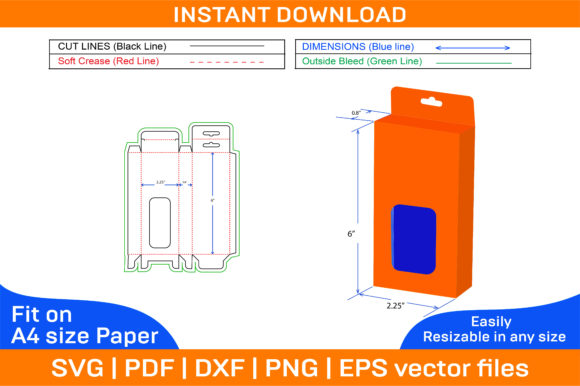
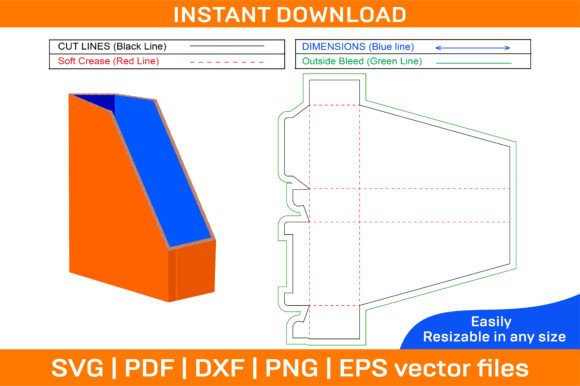
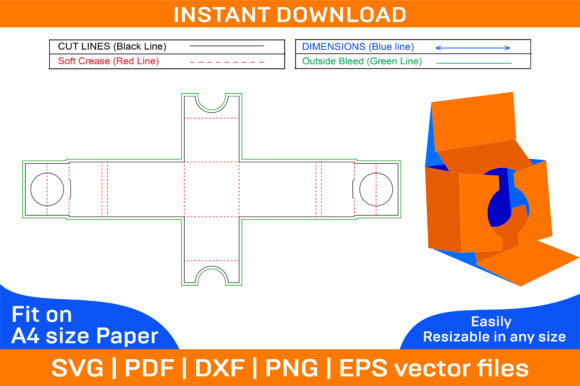
The CC Camera Packaging Box Dieline Template is a professionally designed, editable box layout ideal for crafting custom packaging for cameras, lenses, and related products. It includes all necessary dielines (cut lines) and fold lines to ensure precise construction of paper boxes, folding boxes, and printable boxes. This template is not only practical but also adaptable to various design needs thanks to its high-resolution vector files.
Inside the ZIP archive, you’ll find SVG, PDF, EPS, DXF, AI, and PNG files—each tailored for compatibility with industry-standard design software like Adobe Photoshop, Illustrator, Silhouette Studio, Cricut Design Space, and AutoCAD. These formats allow for seamless integration into your workflow, whether you're a seasoned designer or just starting out.
One standout feature is that the template comes in both color and blank versions. The blank option gives you full control to print on any colored paper you prefer, enabling you to align the packaging with your brand identity or seasonal themes. Additionally, since all files are vector-based, they maintain crisp, clear edges at any size, ensuring professional results regardless of printing scale.
Why Use a Customizable Box Template?
Standard packaging often lacks the personality needed to stand out in a crowded marketplace. With the CC Camera Packaging Box Dieline Template, you can inject your unique style into the design process. This allows for:
- Brand consistency: Match your box design to your website, social media, and other marketing materials.
- Cost efficiency: Avoid expensive custom die-cutting by using a ready-made, high-quality template.
- Flexibility: Easily modify dimensions, colors, and images without technical expertise.
- Speed to market: Get your packaging designed and printed faster, accelerating product launches.
Real-World Applications
This versatile template finds its place across multiple industries and use cases. Here are some realistic examples of how it can be applied:
- Photography Equipment Brands: Create branded packaging for memory cards, tripods, filters, or camera straps. Add your company logo, product name, and descriptive text to build a cohesive look.
- Camera Accessories for Gift Boxes: Design elegant foldable boxes to package curated camera kits as gifts. Customize with festive colors, holiday motifs, or personalized messages.
- DIY Creators and Hobbyists: Use the template to craft custom boxes for your handmade camera gear. Showcase your creativity by applying textures, patterns, or hand-drawn illustrations.
- Event Photography Kits: Package disposable or travel-friendly camera accessories in custom-designed boxes for weddings, photo booths, or street photography events.
- Small Business Owners: If you’re selling vintage or retro-style camera parts, the customizable nature of the template lets you create nostalgic designs that reflect your niche perfectly.
How to Adapt the Template for Different Goals
Depending on your audience and platform, there are several ways to make the most of this template. Let’s explore a few approaches:
For Marketers: Build a Strong Visual Identity
Marketers can leverage the template to reinforce their brand message through visual storytelling. By selecting consistent colors and imagery, they can create packaging that feels like an extension of their digital presence. Consider adding QR codes, hashtags, or short promotional copy to encourage engagement and drive traffic to your online store or social media channels.
For Educators and Bloggers: Share Creative Tutorials
If you run a design blog or teach packaging design, the CC Camera Packaging Box Dieline Template serves as an excellent teaching tool. Walk your audience through the process of editing the file in Illustrator or Photoshop, showing them how to adjust measurements, apply textures, or add branding elements. You could even host a live demo or downloadable tutorial to help others get started quickly.
For Entrepreneurs: Streamline Product Launches
Entrepreneurs benefit from the time-saving aspect of this template. Instead of waiting weeks for bespoke packaging, they can download, customize, and print within hours. This is especially useful for startups or small businesses with limited budgets. Pair the box design with minimal branding for a clean aesthetic or go bold with vibrant graphics and typography to grab attention on retail shelves.
For Freelancers and Designers: Offer Bespoke Solutions
Freelancers can use this template as part of their portfolio or client offerings. It provides a solid base for designing custom packaging solutions for clients in the photography sector. Because it supports color changes and image overlays, you can offer a variety of styles—from minimalist and modern to vintage and rustic—to match each client’s vision.
Designing with the CC Camera Packaging Box Template
Getting creative with the template is straightforward. Start by choosing the format best suited for your design software. Vector-based files like AI and SVG allow for complete scalability and precision, while PDFs are great for quick layouts. Here are some tips for maximizing your design efforts:
- Start with the blank template: This gives you freedom to choose your own paper stock and ink colors, helping you achieve a truly unique finish.
- Use the color template as a base: If you want to work with pre-set colors, begin with the color version and tweak the hues to better suit your theme.
- Layer your content thoughtfully: Organize information clearly so that users can assemble the box easily. Include product names, instructions, and key features prominently.
- Experiment with 3D visualization: The 3D box model included in the template helps you preview how the final product will look when folded. This is essential for ensuring visual appeal and functionality.
Practical Project Ideas
Here are a few project ideas to spark your imagination and demonstrate the real-world potential of the CC Camera Packaging Box Dieline Template:
- Eco-Friendly Packaging: Print the blank template on recycled kraft paper and decorate with plant-based dyes or natural textures. This appeals to environmentally conscious customers and reflects sustainable values.
- Mini Camera Storage Boxes: Modify the template to smaller sizes for organizing SD cards, batteries, or cleaning tools. These can be sold individually or as part of a kit.
- Interactive Packaging: Add flaps, windows, or pop-up elements to engage users. For example, include a hidden compartment with a thank-you note or product warranty inside the box.
- Themed Packaging for Events: If you're preparing for a photography convention or trade show, create themed boxes with event logos, dates, and locations. This doubles as a promotional item and product container.
- Personalized Gifts: Sell customized boxes where buyers can upload their photos or names. Perfect for birthdays, anniversaries, or special occasions.
Keeping It Clear and Consistent
While customization is a major advantage, it’s important to maintain clarity and consistency in your final design. Here are some guidelines to follow:
- Align text and graphics properly: Ensure that labels and images are positioned according to the fold lines and cutouts. Misalignment can lead to assembly issues or unprofessional-looking results.
- Test before printing: Print a sample box on regular A4 paper to check fit and readability. This helps catch errors early and saves material costs.
- Optimize for different platforms: If you plan to sell your boxes online, consider how they’ll appear in product listings. Use high-quality PNG previews to showcase the design effectively.
- Stay original: While the template is a great starting point, avoid generic designs. Incorporate unique elements that set your product apart from competitors.
Tools and Techniques
Working with the CC Camera Packaging Box Dieline Template is made easier with compatible software. In Adobe Illustrator, you can adjust colors, fonts, and dimensions effortlessly. Photoshop is ideal for adding photographs or detailed backgrounds. For those who enjoy hands-on crafting, Silhouette Studio or Cricut Design Space let you cut and assemble the boxes with ease.
AutoCAD users may appreciate the DXF file for technical accuracy, especially if they need to integrate the box into larger manufacturing plans. No matter which tool you choose, the template adapts well to different workflows, allowing you to focus on what matters most—your design.
Conclusion
The CC Camera Packaging Box Dieline Template is more than just a set of files—it’s a gateway to creative expression and brand development. Its compatibility with popular design software, combined with its adaptability and high-quality output, makes it a valuable asset for anyone involved in packaging design. From entrepreneurs to educators, this template empowers you to bring your vision to life efficiently and effectively.
So whether you're looking to launch a new product line or simply enhance your current packaging strategy, the CC Camera Packaging Box Dieline Template is a must-have in your creative toolkit. Start experimenting today and discover how it can transform your brand’s physical presentation into something memorable and meaningful.